v2.1.3 for Mac OS
X
save with:

iChat Rocks! Bundle
|
 |
iGlasses 2
total control of your mac's webcam

Adjust and manipulate your webcam's video settings from within iChat and
many other programs, including
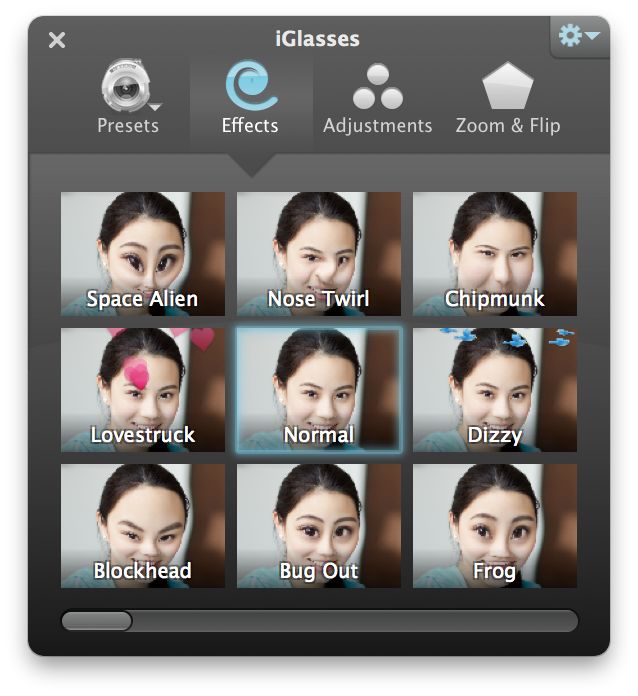
iMovie, Photo Booth, Yahoo! Messenger, Skype and web-based chat. Apply easy preset settings and fun effects to your video conferences and recordings.
 | |
Adjust colors, brightness, and even pan and zoom your Mac's built-in iSight. The picture from your iMac, MacBook or MacBook Pro has never looked so good.
|
 | |
Is your external iSight looking a bit dark? You could install studio lighting, or just install iGlasses to give your videos an instant brightness boost.
|
 | |
iGlasses is a great companion to your iMage USB Webcam. Fine tune your colors for a perfect picture every time.
|
 | |
It's not just for iSight! If you use a Logitech QuickCam or other 3rd-party webcam that uses UVC or the macam driver, iGlasses will add the same great adjustments and features.
|
Choose from Easy Settings
iGlasses offers one-click preset adjustments, such as Enhanced:
Fine-Tune To Look Your Best
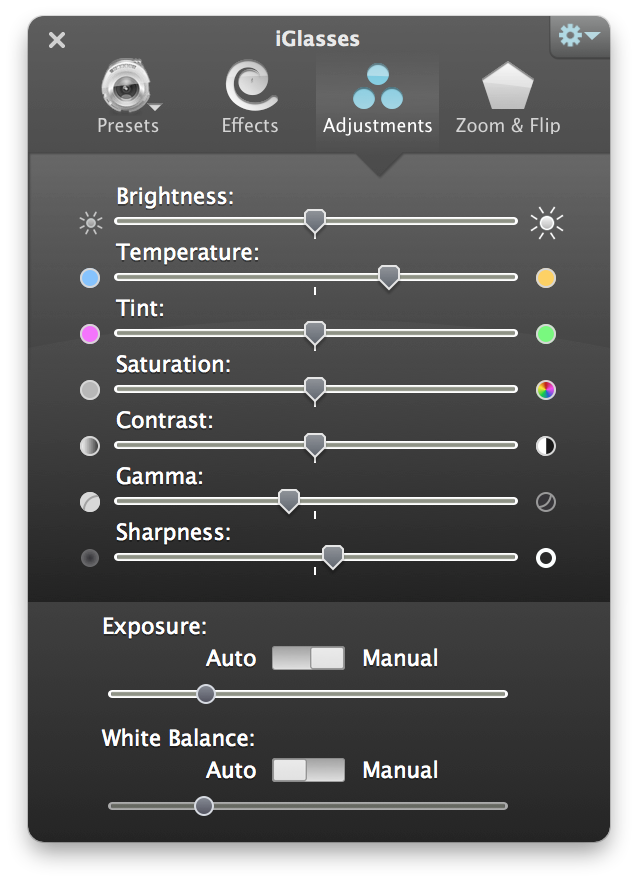
Adjust the following camera settings from within your favorite program:
 |
| Brightness |
 |
Contrast |
 |
Color Balance |
 |
Hue |
| Focus |
 |
Gain |
 |
Orientation |
 |
Shutter Speed |
| Zoom |
 |
White Balance |
 |
Sharpness |
 |
Saturation |
Note: Some cameras may not offer all of the settings listed above. See details in the online manual.
Digital Pan and Zoom
Even though your iSight is fixed firmly to your Mac, iGlasses will let you zoom in to better frame a shot. Even adjust your pan and zoom from across the room using your Apple Remote.
Rotate and Mirror Image
Rotate the picture from the webcam to be upside-down or sideways. Now you're free to mount your camera anywhere you want, even right on the side of your Apple Cinema Display.
Mirror image is also available.
Night Vision and Manual Focus
Choose from built-in preset
settings or fine-tune settings manually to tweak the white balance or even give yourself a tan. Even videoconference in total darkness with Night Vision.
You can save your custom adjustments for later use. Your saved presets will appear in the iGlasses menu below the built-in presets.
system requirements
>>
Mac, Leopard, Snow Leopard, iChat, iPhone, iPod Touch, QuickTime, iPhoto, iMovie, Mac OS X, Photo Booth, PowerBook, iSight, MacBook and MacBook Pro are trademarks of Apple Inc.
|
 |
 |
Look better with one click:

Solve color problems:
Perfect framing:
|
“
I just wanted to compliment you on how easy it was for me
to retrieve and download the iGlasses software the other
day. I purchased the software a month ago and thought it
was an excellent add-on.
”
 |
-Brad Fitzgerald
|
|